From a Classroom Demo to a Customer Segmentation App
Some projects start with a roadmap. This one started with a lesson plan.
In November 2024 I lectured the Machine Learning module of Análise de Dados: Especialização em Dados, an online continuing-education course at the Instituto Politécnico de Viana do Castelo. The module was short, twelve hours in total, and clustering had to fit inside it alongside everything else. I needed an example that a group of professionals with very different backgrounds would understand in one sitting, and that would still be honest about how the technique works.
The classroom version
Customer segmentation is the ideal teaching case for clustering. Everybody understands the business question: which groups of customers do I actually have, and how should I treat each one differently? So I built a Google Colab notebook in Python around a small dataset of customer purchasing behaviour, ran K-Means on it, and projected the result onto two dimensions with PCA so the segments showed up as coloured clouds on a single chart.
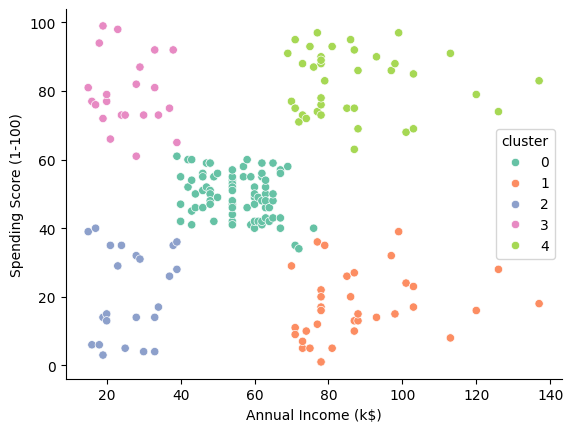
The chart from the course notebook. Five segments found by K-Means, plotted by annual income against spending score.
That chart did most of the teaching. Students could see that the algorithm had found structure nobody had labelled, argue about whether four clusters or five made more sense, and connect each cloud back to a type of customer they recognised from their own work. The notebook was never meant to live beyond the course.
It kept growing
It did live beyond the course, though. A few weeks later I rebuilt it as a Streamlit app running locally. The clustering logic stayed the same, but the result was no longer a static chart. Once the segmentation finished, the app sent each segment’s profile to an OpenAI model and asked for a suggested marketing approach. The point was to close the loop that students always asked about: fine, I have five clusters, now what do I do with them?
Then came a second prototype, this time inside Google AI Studio’s Build feature, done in what people now call vibe coding. I described what I wanted, iterated on the generated code, and kept the segmentation logic I had already proven in Streamlit. This version added a social media post generator on top of the strategy, so a marketer could go from raw customer file to a draft post for a chosen segment without leaving the page.
It was a convincing demo. It was also, like most vibe-coded demos, held together with tape.
Making it real
Almost a year after the course, I decided the idea deserved a proper build. Using Claude Code, running on Fable 5.1, I exported the AI Studio project and turned it into a real web application, now called SegmentAI Analyst.
The shape of the app is simple on purpose. A marketer uploads a customer file as CSV, Excel, or plain text. They pick a clustering model. The app trains it, shows a dashboard of the resulting segments, and on request generates a marketing strategy for any segment, plus social media posts to match. The AI side runs through Gemini on a small Express backend, so the API key never reaches the browser.
The biggest change from the prototypes is the clustering itself. SegmentAI Analyst offers two models, and the choice genuinely matters:
- K-Means assigns every customer to exactly one segment. It is fast, easy to explain, and usually the right first answer.
- Gaussian Mixture Models give each customer a probability of belonging to every segment. That soft assignment is closer to reality, where a customer can be eighty percent “loyal regular” and twenty percent “bargain hunter”, and it lets the dashboard show how confident the model is about each point.
Both are implemented in TypeScript and run in the browser inside a Web Worker, so there is no Python service to deploy and the interface stays responsive on large files. The number of segments is chosen automatically, using silhouette score for K-Means and BIC for GMM, and can be overridden from the dashboard when the marketer disagrees with the machine. Columns that look like identifiers are excluded, constant columns are dropped, rows with missing values are reported rather than silently turned into noise, and the chart axes finally say which principal components they show instead of “Metric A” and “Metric B”.
What I took from it
Three things stand out to me, looking back over the year.
Teaching is a good product discovery process. The questions students asked in that twelve-hour module shaped every feature that came later. “Now what?” became the strategy generator. “Which one of these would I post about?” became the social content tool. “Why four clusters?” became the k selector with its scores on display.
Prototypes are for learning, not shipping. The Colab notebook, the Streamlit app, and the AI Studio build were each the right tool at the right moment. None of them was the final product, and I would have wasted effort pretending otherwise.
AI coding tools change the economics of “making it real”. The gap between a working demo and a robust app used to be the part most side projects died in. With Claude handling the design discussion, the implementation, and the test scaffolding, that gap is now something one person can cross in evenings.
If you want to see where the classroom demo ended up, try SegmentAI Analyst with your own customer file.
If you teach, build the example that your students keep asking about. It might turn out to be the start of something.