Teaching Accountants Automation with a Real Invoice Pipeline
Accountants do not need to be convinced that repetitive work exists. They live in it. What they need to see is the exact moment a machine takes a piece of it away and does not break anything.
I was asked to lecture a 15-hour introductory course on AI for accountants. The audience was practical people with full inboxes, and I knew that slides about large language models would last about twenty minutes before someone asked the only question that matters: fine, but what would this actually do in my office? So I built the answer before the course started, as a working automation they could watch run.
The example I chose is the most universal process in any accounting practice: a supplier invoice arrives by email, and someone has to read it, file it, record it, and decide whether it needs a signature before payment.
What the workflow does
The whole thing runs in n8n, connected to Gmail, Google Drive, Google Sheets, and an OpenAI model. From the moment an invoice lands in the inbox, no human touches it unless the workflow decides a human should.
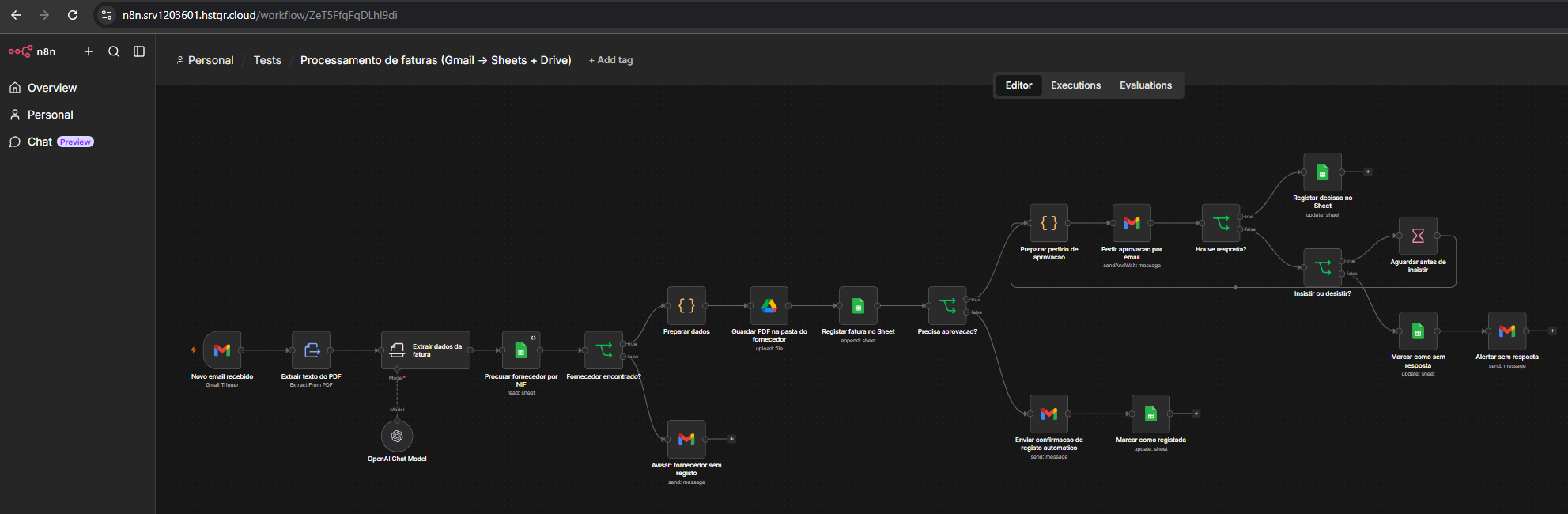
The complete workflow in n8n. The straight path along the middle is the happy case. The loop on the upper right is the approval chase.
Step by step:
- Watch the inbox. A Gmail trigger polls every minute for new emails with a PDF attachment.
- Read the invoice. An LLM reads the PDF, whether it is a native document or a scanned image, and turns it into structured fields against a fixed schema: supplier, tax number, invoice number, issue and due dates, subtotal, VAT, total, currency, IBAN, a one-line description, and the line items. The prompt is strict. Dates in ISO format, amounts as plain numbers, nine-digit Portuguese tax numbers, and an explicit instruction not to invent anything that is not on the page.
- Identify the supplier. The extracted tax number is looked up in a Google Sheet of suppliers. That sheet is the configuration of the whole system. Each row holds the supplier’s official name, their Drive folder, who approves their invoices, who to escalate to, and the range their invoices usually fall in.
- File the PDF. The attachment is renamed to date, supplier, and invoice number, and uploaded to that supplier’s folder in Drive.
- Record it. A row is appended to an invoice register sheet with every extracted field, the sender, the reception date, and a link to the file.
- Decide. If the total is above five thousand euros, or outside the supplier’s usual range, the invoice needs approval. Otherwise it is marked as registered and a confirmation email goes out.
If the tax number is not in the supplier sheet, the workflow stops and sends an alert with the extracted details and a one-line instruction: add the supplier, then reprocess. The machine does not guess which client a document belongs to.
The part the students liked most
The approval loop is where the room got quiet.
When an invoice needs a signature, n8n sends an email to the approver with the invoice summary, a link to the PDF, a link to the register, and two buttons: approve or reject. Then it waits. For up to twenty-four hours, that execution simply sits there holding its place.
If the approver clicks, the decision, the timestamp, and the name are written back to the register row. If nobody clicks, the workflow waits two more hours and sends a reminder. On the third attempt it gives up on the approver and sends the request to the escalation contact instead. After three unanswered requests it marks the row as “no response” and alerts the accountant to handle it by hand.
That is a complete chase sequence, the kind a junior would run from a sticky note on their monitor, running without anyone remembering to do it. For accountants, this was the moment automation stopped being about saving typing and started being about control.
Why it moved from Relay to n8n
The first version of this demo was built in Relay.app. It is a good tool, and for the first pass it was fast: the AI extraction step, the lookup, the branching paths, and the notify-on-no-match behaviour all came together in an afternoon.
I migrated to n8n before the course for two reasons. The first was flexibility. The approval loop above needs a counter, a conditional on that counter, a timed wait, and a path back to an earlier node. That is a loop with state, and it is far more natural to express in n8n, where a small code node can carry the attempt number and pick the recipient, than in a tool that wants every flow to be a straight line with branches.
The second was tooling. n8n shows every execution with the data that flowed through each node, which is exactly what you want when teaching. A student can click on the extraction step and see the raw invoice text going in and the structured JSON coming out. They can see the Sheets lookup return an empty row and watch the workflow take the alert branch. Nothing is hidden, so nothing feels like magic.
The sticky notes in the workflow still map each section back to its Relay equivalent. I kept them on purpose, because half the class had seen the Relay version first.
What I took from it
Teach with a process the audience already owns. Nobody in that course had to be told why invoice processing matters. The example carried its own motivation, and every design decision could be argued in their terms, not mine.
Put the configuration in a spreadsheet. The supplier sheet is the only thing an accountant needs to edit to onboard a new client: name, folder, approver, usual amounts. No one has to open n8n to change how the system behaves. That single decision is what makes the automation adoptable rather than just impressive.
Design the “I don’t know” paths first. Unknown supplier, no approval, silence from the approver. The happy path took an hour. The exception paths took the rest of the time, and they are the reason an accountant would ever trust the thing with real invoices.
If you run a practice and want to see this running on your own invoices, or you want a hands-on session like this for your team, get in touch.